
Chapter 2. Introduction
 The Güralp 3TB is a three-axis seismometer consisting of three sensors stacked vertically in a sealed borehole sonde, designed for use in cased boreholes with diameters between 99 mm (≈3.9 “) and 203 mm (≈8 “).
The seismometer system is self-contained except for its 12 – 30 V power supply, which is provided through the same cable as the analogue data. Sensor functions such as levelling and mass locking are carried out through a surface control box.
The 3TB's sensors are sensitive to ground vibrations across thee entire seismic spectrum, with a flat response to velocity in the frequency range 0.0027 Hz (360 seconds) to 50 Hz. It outputs analogue voltages representing ground velocity on balanced differential lines. Each seismometer is delivered with a detailed calibration sheet showing its serial number, measured frequency response in both long and short period sections of the seismic spectrum, sensor DC calibration levels, and the transfer function in poles/zeros notation.
2.1 System configuration
The Güralp 3 series of seismic instruments share a number of features:
a modular sensor sonde, which can be fitted with a single-jaw or three-jaw hole-lock mechanism as required,
a pit-head installation including a breakout box, and
a number of additional, optional control units which may be connected to the breakout box to perform installation and maintenance tasks.
For example, a borehole or pit installation of a 3TB or 3ESPB instrument with single-jaw hole lock has the following layout:
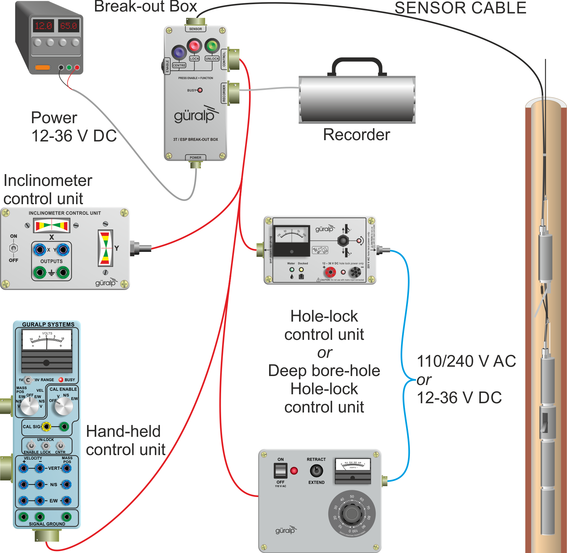
Güralp 3-series instruments are also suitable for installing in boreholes with sand back-fill. In this case no hole lock unit is necessary.
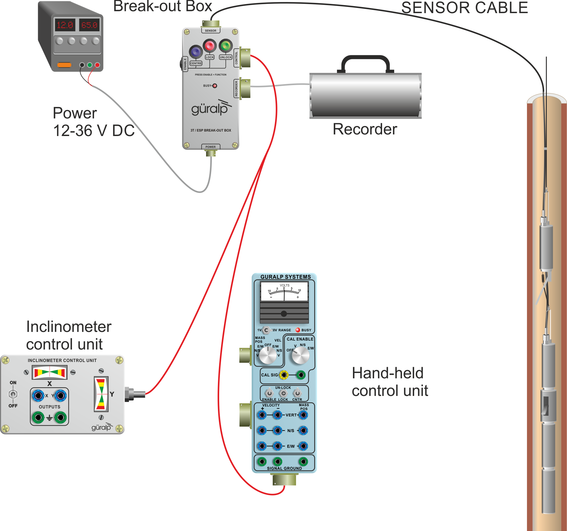
The 3V sensor is identical to the vertical-component module of the 3TB instrument, allowing you to build mixed arrays of 3V and 3TB sensors with identical response characteristics.
2.2 Digital borehole installations
The Güralp DM24 digitizer is available in a borehole sonde form. Connecting a Güralp borehole instrument to a down-hole digitizer allows you to construct a true digital borehole installation. This has several advantages over a traditional borehole set-up:
Digital signals are not subject to attenuation as they travel up to the surface, so signals received are stronger and more reliable.
Digitizing the data at source allows you to ensure that its origin can be reliably traced.
The DM24 digitizer may also be combined with an Authentication Module within the borehole sonde, allowing you to generate cryptographically-signed data at the point of origin.
A digital borehole installation can be provided with RS232, RS422 or fibre-optic links to the surface, depending on the depth of the borehole and the distance from the well-head to the surface controller (i.e. the total cable length).
When a down-hole digitizer is present, it takes the place of the strain relief unit in the borehole. The surface unit also takes a slightly different form, with a serial connector allowing you to attach a modem or other communications link. In this type of installation, instead of using the surface unit to pass control signals to the sensor, all functions are accessed remotely via the digitizer.
If you prefer to install a stand-alone digitizer at the surface, it should be connected to the 26-pin “RECORDER” socket of the breakout box.
2.3 The hole lock system
The hole lock clamp unit in a 3TB instrument provides a stable platform for the sensor modules mounted above and below it. It is designed to maintain a positive pressure on the borehole casing over a prolonged period of time without attention, and to fix the sonde in place whilst avoiding transmitting any stresses.
Güralp Systems hole locks are constructed to order from accurate measurements of your borehole at the depth you wish to install the instrument. Either single-jaw or three-jaw hole lock units can be manufactured.
In installations with sand back-fill, or where the instrument rests on the bottom of the borehole, a hole lock may be unnecessary.
2.3.1 The single-jaw hole lock
The single jaw hole lock is the standard option for triaxial borehole instruments. It consists of an active clamp arm and a number of skids or studs on the sonde body. The arm is attached to a compression spring, which forces it to swing out from the sonde and wedge the body against the borehole wall. A textured steel jaw at the end of the arm provides maximum grip against the borehole casing. The skids or studs and the locking arm together form a multi-point clamp, which aligns the sonde body parallel to the axis of the borehole and holds it firmly in place so that it cannot twist or slip under the influence of ground vibrations.
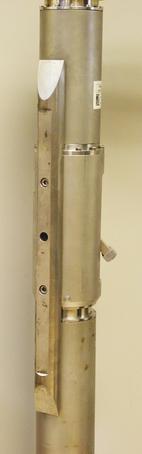 There are several configurations of skids and studs which can provide a suitable clamp. Either
the locking jaw pushes two steel skids against the side of the borehole, providing two line contacts;
only the tips of the skids come into contact with the borehole, providing three point contacts;
a single skid is combined with a pad to provide one line and one point contact; or
three studs provide three point contacts.
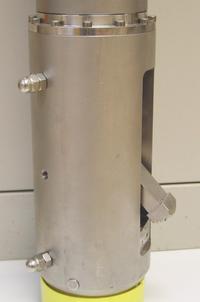
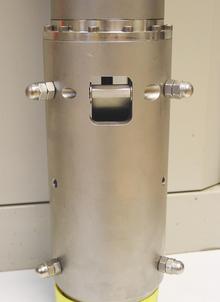 Studs have the advantage of being smaller than skids, but the contact points are very close to each other. You should evaluate the various locking methods available to see which works best in your borehole.
The spring inside the lock provides around 60 kg of force at its locking position. A DC actuator retracts the arm into the body of the lock so that the sensor mechanism can be installed and removed. The actuator consists of a 14 W DC motor with a planetary reduction gear-head, which drives the nut of a ball lead screw through the helical drive gears. The thread of the lead screw is prevented from turning, and so moves linearly when the nut turns.
The motor has a power system separate from that of the sensor, and can be controlled from the surface using a hole lock control unit. Once the sonde is installed, the hole lock control unit may be removed. Without power, the hole lock will not be able to retract, and the sensor will be secured.
2.3.2 The three-jaw hole lock
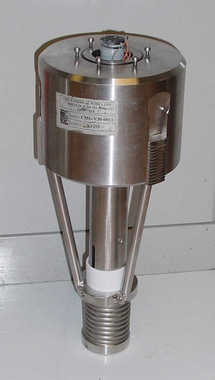 A three-jaw hole lock is available which gives better grip on the borehole casing, but is bulkier and heavier than the single-arm lock. This is the standard option for uniaxial instruments; it can be installed in boreholes between 99 mm (≈3.9 “) and 203 mm (≈8 “) in diameter.
The three-jaw hole lock consists of a set of three active clamp arms attached to a compression spring, which forces them to swing out from the sonde and wedge themselves against the borehole wall. Serrated steel jaws at the end of each arm provides maximum grip against the borehole casing. This configuration ensures that the sonde body is held parallel to the axis of the borehole and prevented from twisting or slipping under the influence of ground vibrations.